
An understanding of techniques used to retrieve unstructured information is vital for meeting information needs as methods are vastly different from those used to search structured data. I frequently perform searches to meet both my own and my customers' research needs, but had given little thought to formulating research zones and content components (Morville and Rosenfeld, 2006, p.151) and the models mentioned by Wilson (1999).
"Problem solving is the underlying motivation for information searching." (Wilson, 1999, p.265) When met with a specific problem, such as, 'When was JavaScript invented?' a known approach is useful but cannot help with vague queries. Exhaustive approaches are useful for narrow topics, but a search for "simple SQL queries" on Bing returns 67.5 million results. I have found the exploratory technique most useful for this module. For example, "javascript tutorial" AND "for beginners" gives 13,000 results. Reading the first few results, I was interested in learning about while loops and alert boxes, so used the following query to retrieve a manageable and relevant set of results:
("while loop" OR "alert box") NEAR "javascript tutorial"
Other considerations include using proper nouns. HTML or html would make little difference, but case-sensitive searching would aid us when, for example, searching for information on Apple or Adobe. Boolean searches can aid us, for example users looking for information on the democratisation of information may find information on the Democratic political party if they do not employ effective search techniques.
Information retrieval is much more difficult than data retrieval, as we must use our information-seeking skills to transform data into information. Morville and Rosenfeld (2006) assert, "...search is there for users," (p. 150) and we must look at information seeking from a user's perspective if we are to meet their information needs.
Sunday, 29 November 2009

Friday, 20 November 2009
Exercise 3.7 -- Databases
Organisations storing digital information should familiarise themselves with relational databases. They are secure, quick to access, and high in integrity compared to data held in databases using the file format. This week SQL queries were used to manipulate and retrieve data from biblio, a relational database; I took the hypothetical task of weeding Computing books from a library.
Before running any queries, I used the show tables and desc commands to check the contents of the database and the format the data was held in, which affects how the data can be meaningfully displayed and manipulated. In the titles table, for example, the subject field was poorly populated and the notes field poorly described as it appeared to contain Dewey Decimal classmarks.
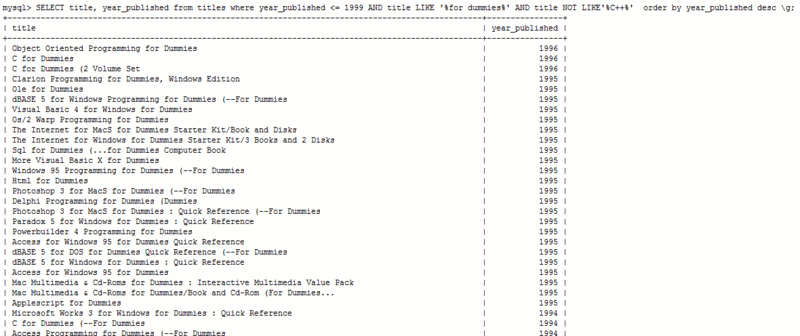
I ran a simple query to find all books in the '...for Dummies' series, ordered by year published, displaying data in a grid format. This list had 48 items, but was not very specific. For instance, the librarian for Computing may tell me she only wants to discard books over ten years old, and does not want to weed any books on C++. The following query was entered, yielding 44 results (click to enlarge):

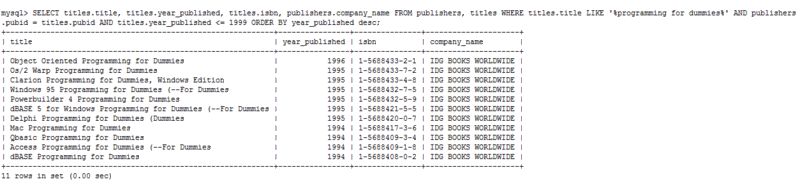
Lastly, the ordering team may wish to know details of the publisher and ISBN alongside the other details; the following query was used to join the publishers and titles tables together (click to enlarge)

Though a hypothetical example, I undertake similar collection management tasks at work using the Millennium library management system, which uses Boolean logic to search patron, item and bibliographic records. I have learned vital transferable skills as I know how to extract data precisely and adeptly, as opposed to running vague queries and sifting through print-outs due to employing inefficient search techniques.
Before running any queries, I used the show tables and desc commands to check the contents of the database and the format the data was held in, which affects how the data can be meaningfully displayed and manipulated. In the titles table, for example, the subject field was poorly populated and the notes field poorly described as it appeared to contain Dewey Decimal classmarks.
I ran a simple query to find all books in the '...for Dummies' series, ordered by year published, displaying data in a grid format. This list had 48 items, but was not very specific. For instance, the librarian for Computing may tell me she only wants to discard books over ten years old, and does not want to weed any books on C++. The following query was entered, yielding 44 results (click to enlarge):
Though a hypothetical example, I undertake similar collection management tasks at work using the Millennium library management system, which uses Boolean logic to search patron, item and bibliographic records. I have learned vital transferable skills as I know how to extract data precisely and adeptly, as opposed to running vague queries and sifting through print-outs due to employing inefficient search techniques.
Friday, 13 November 2009
Exercise 3.6 -- CSS
This week, I learned about the Document Object Model (DOM), a W3C standard which lets programmers manipulate XML and HTML documents by incorporating scripting languages. This allows for dynamic documents wihch are cross-browser compatible (W3C, 2004). I then learned about Cascading Style Sheets (CSS), used to separate the presentational elements of an HTML document from its structure. Styles can be included within documents, but linking to an external document is preferable as the advantages of CSS can be fully exploited. Part of this week's exercise entailed applying presentational elements to my web page using CSS, and my examples are available from http://www.student.city.ac.uk/~abgy261/css.html.
When accessed for the first time, a copy of the CSS is saved in the browser's cache; this saves bandwidth if subsequent files using the CSS are accessed. A CSS includes all the presentational elements, so the size of the HTML document may be reduced. Global changes can be made from a single document, saving authors time and allowing consistency. When creating web pages at work, I apply the default style sheet so my page fits with Leeds University Library's overall look and feel. CSS documents also improve accessibility, for example including styles for screen readers, mobile devices and a style to correctly render a document for printing. Unfortunately, a CSS only tells the browser how information should be displayed. Browsers do not adhere to the rules, so as with all web documents, it is crucial to check the presentation on a variety of browsers and use a tool like the W3C's validator.
A CSS can be used to format XML documents. Learning how to do this was beyond the scope of the lectures, although I learned that the W3C recommends XSLT (XSL Transformations) for this purpose as it is more extensive and extensible, although current browser support for this technology is poor (W3C, 2009b).
When accessed for the first time, a copy of the CSS is saved in the browser's cache; this saves bandwidth if subsequent files using the CSS are accessed. A CSS includes all the presentational elements, so the size of the HTML document may be reduced. Global changes can be made from a single document, saving authors time and allowing consistency. When creating web pages at work, I apply the default style sheet so my page fits with Leeds University Library's overall look and feel. CSS documents also improve accessibility, for example including styles for screen readers, mobile devices and a style to correctly render a document for printing. Unfortunately, a CSS only tells the browser how information should be displayed. Browsers do not adhere to the rules, so as with all web documents, it is crucial to check the presentation on a variety of browsers and use a tool like the W3C's validator.
A CSS can be used to format XML documents. Learning how to do this was beyond the scope of the lectures, although I learned that the W3C recommends XSLT (XSL Transformations) for this purpose as it is more extensive and extensible, although current browser support for this technology is poor (W3C, 2009b).
Tuesday, 10 November 2009
Exercise 3.5 -- XML
Prior to this week's exercise, I had heard of XML, but did not realise its relevance to libraries. Unlike HTML, which Bosak and Bray (1999) likened to a fax machine, XML focuses on data's meaning as opposed to its presentation (TEI, 2004). As an extensible language, authors of XML documents can write their own DTD or use an existing DTD such as Dublin Core to define task-specific elements and attributes, describing data with as much semantic precision as necessary. XML was designed to be interoperable, so any application with access to the DTD specified in an XML file can make sense of it. Information can be exchanged between different applications without loss of meaning. These factors facilitate the retrieval of data.
In academic libraries, XML has been used to transfer data between institutional repositories (Bishop, 2007). Special Collections staff at Leeds University Library are receiving training in cataloguing manuscripts using the EAD (Encoded Archival Description) DTD for inclusion into the library's digital repository. Stanford University's Medlane Project created XMLMARC to convert MARC catalogue records into XML and facilitate their manipulation.
For this week's exercise, I used XML to solve the problem of collecting information about our missing library items, which are currently recorded on manually sorted paper slips. This would allow information to be passed between customer service staff, academic librarians, and collection management services. The links below show my DTD and XML file, which were checked for validity and well-formedness using validome.org's XML validator.
http://www.student.city.ac.uk/~abgy261/missinglist.dtd
http://www.student.city.ac.uk/~abgy261/missinglist.xml
Bosak and Bray (1999) envisaged, "...millions of XML documents pulsing around the Internet," yet a cursory look at the Internet shows this is not yet the case. To best convert information into knowledge we must imbue digital information we create with semantic meaning.
In academic libraries, XML has been used to transfer data between institutional repositories (Bishop, 2007). Special Collections staff at Leeds University Library are receiving training in cataloguing manuscripts using the EAD (Encoded Archival Description) DTD for inclusion into the library's digital repository. Stanford University's Medlane Project created XMLMARC to convert MARC catalogue records into XML and facilitate their manipulation.
For this week's exercise, I used XML to solve the problem of collecting information about our missing library items, which are currently recorded on manually sorted paper slips. This would allow information to be passed between customer service staff, academic librarians, and collection management services. The links below show my DTD and XML file, which were checked for validity and well-formedness using validome.org's XML validator.
http://www.student.city.ac.uk/~abgy261/missinglist.dtd
http://www.student.city.ac.uk/~abgy261/missinglist.xml
Bosak and Bray (1999) envisaged, "...millions of XML documents pulsing around the Internet," yet a cursory look at the Internet shows this is not yet the case. To best convert information into knowledge we must imbue digital information we create with semantic meaning.
Subscribe to:
Posts (Atom)

